
 WhatsApp
 Pinterest
 Trending -58%
Tuition & Coaching Fee Manager (Excel)
Run your tuition or coaching class without registers. Students, monthly fees, pending dues, batch-wise attendance and one-tap WhatsApp fee reminders in one Excel file.
₹249₹599Save ₹350 (58%)
Inclusive of all taxes · One-time payment · Instant download
Extra 20% off with code LAUNCH20 at checkout
Instant downloadOn screen + email
Secure paymentUPI · Cards · Net Banking
7-day helpFix or refund if faulty
Perfect for
Home tutorsCoaching institutesMusic, dance and art classesSports academies
What you get2 × .xlsx (blank + sample)
Works withMicrosoft Excel · Google Sheets · WPS Office
DeliveryInstant download
LicencePersonal & own-business use
 Save more in a bundleTeacher & Coaching Bundle · ₹499 · you save ₹574See →
 Get everything we makeDraftstack Mega Bundle: Everything · ₹1,999 · you save ₹6,819See →
Chasing fees and keeping attendance registers takes hours every month. This Excel file does it for you.
Add each student once with their batch and monthly fee. Record fees as they come in. The sheet works out how much each student owes, who paid last month and who hasn't, and gives you a ready WhatsApp reminder with the exact amount.
What it does
- Fees due automatically: months since joining × monthly fee, minus what's paid
- WhatsApp fee reminders: a polite message with the pending amount and your UPI ID, opened in one tap
- Batch-wise attendance: pick a batch and month; the student list fills in. Mark P, A, L or H
- Attendance % with alerts for students below 75%
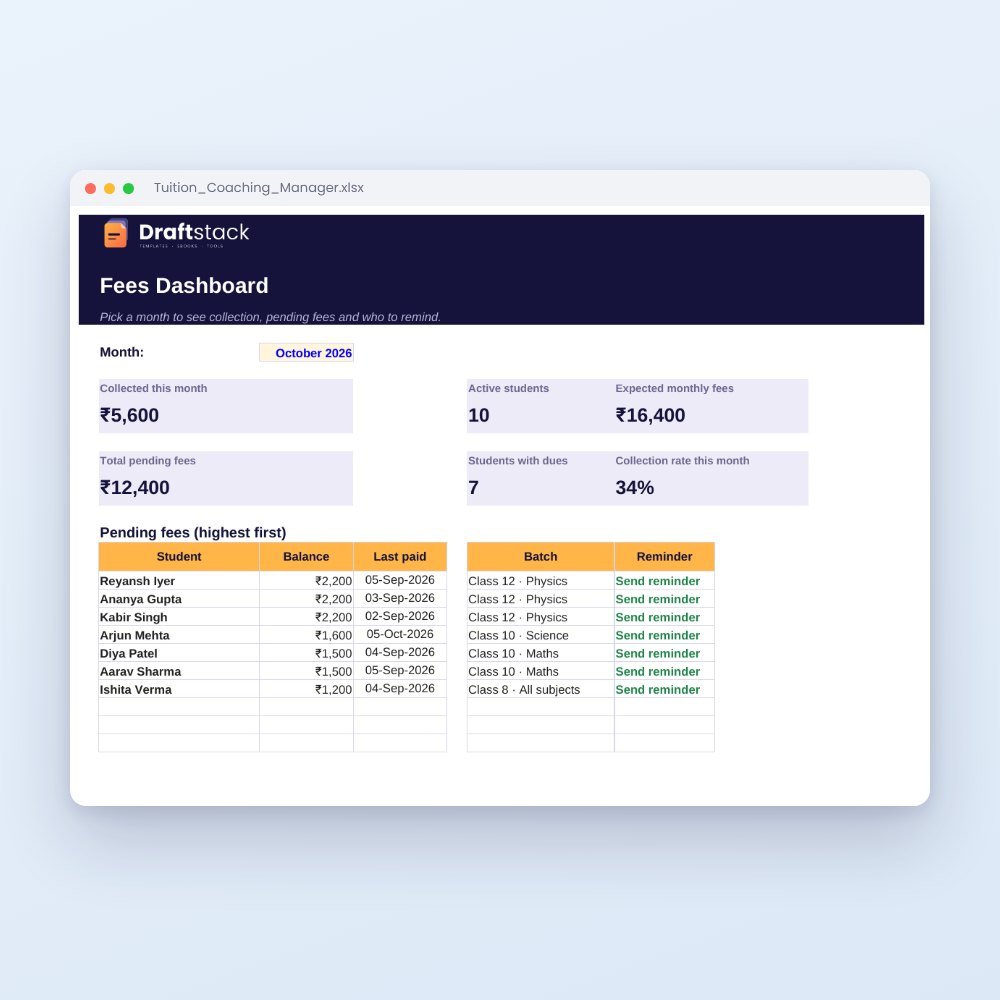
- Dashboard: this month's collection, expected fees, pending dues highest first
- Receipt numbers for every payment
For tuition teachers, coaching institutes, music and dance classes, and any monthly-fee class.
What's inside
Everything you get
01
Dashboard
Monthly collection, active students, expected fees, collection rate and pending fees list
02
Students
200 students with batch, parent WhatsApp, fee, joining date, balance and reminder link
03
Fee Payments
3,000 rows with automatic receipt numbers
04
Attendance
Batch and month selector with P/A/L/H marking and attendance %
05
Batches
Timings, days, teacher, fee and student count
06
Sample file
A filled example with 10 students
Files in your download
- Tuition_Coaching_Manager.xlsx349 KB
- Tuition_Coaching_Manager_SAMPLE.xlsx351 KB
How to use
Start in 5 simple steps
A step-by-step guide is also included inside your download.
- 1
Fill Settings
Institute name, UPI ID and fee due day
- 2
Add batches and students
Once
- 3
Record payments
One row per fee received
- 4
Mark attendance
Pick batch and month
- 5
Send reminders
Tap 'Send reminder' on the dashboard
FAQ
Questions about this product
Does the WhatsApp reminder work on mobile?
The link works in Excel on a computer and in Google Sheets. On phones, tap the link in Google Sheets.
How many students can I add?
200 students and 3,000 payments. You can extend the rows.
Can I use different fees for different students?
Yes, every student has their own monthly fee.
How do I get the files after payment?
A download button appears on screen right after payment, and the link is emailed to you. You can also download again any time from My account.
Can I use it on my phone?
Yes. It works with Microsoft Excel, Google Sheets, WPS Office. Free mobile apps are enough.
What if something does not work?
Write to us within 7 days with your order number. We will fix it, send a working file, or refund you.
Our promiseEvery file is tested before launch. If something doesn't work, we fix it or refund you within 7 days. Refund policy
More to explore
You may also like
Trending -58%
 Trending -60%
 New -60%
 New -60%