
 New -60%
GST Invoice & Billing Generator (Excel)
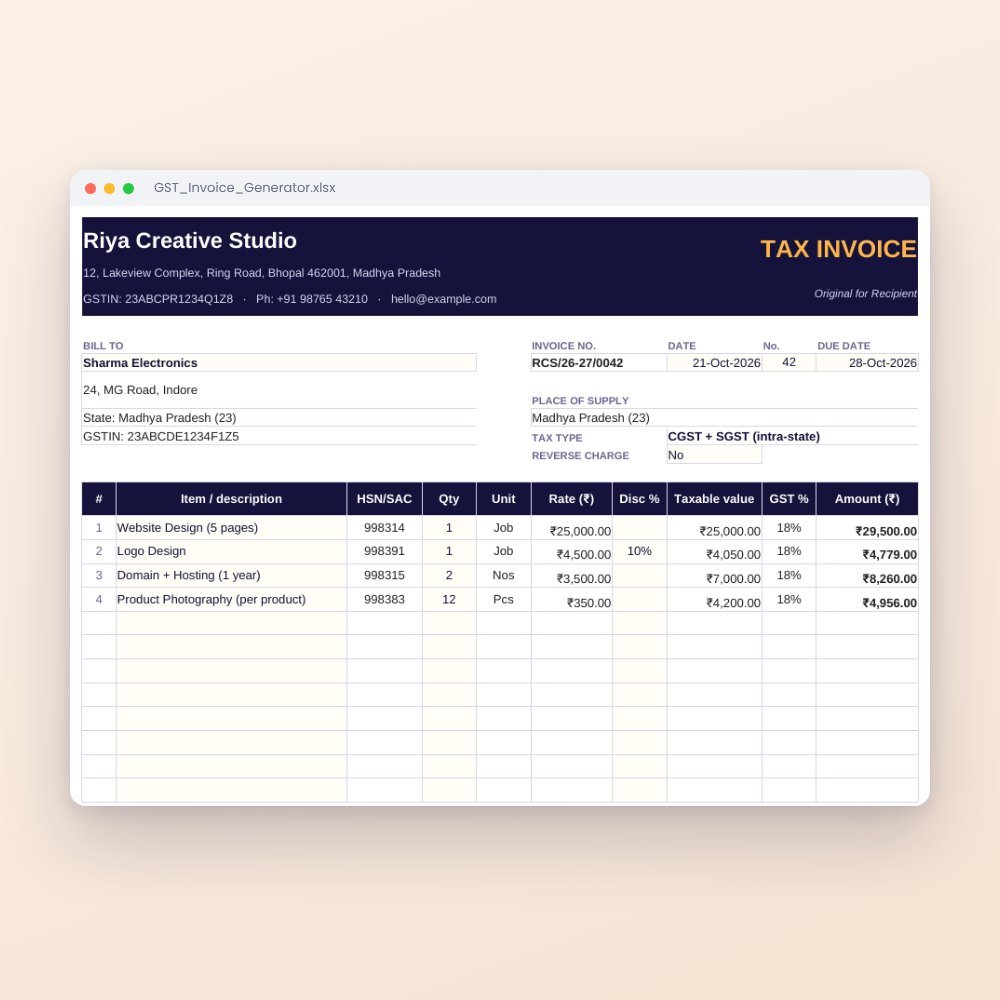
Create professional GST invoices in a minute. Pick a customer and items; CGST/SGST or IGST, totals and amount in words fill automatically. Includes a sales register and monthly GST summary.
₹199₹499Save ₹300 (60%)
Inclusive of all taxes · One-time payment · Instant download
Extra 20% off with code LAUNCH20 at checkout
Instant downloadOn screen + email
Secure paymentUPI · Cards · Net Banking
7-day helpFix or refund if faulty
Perfect for
Shops and tradersFreelancers and agenciesService businessesOnline sellers
What you get2 × .xlsx (blank + sample)
Works withMicrosoft Excel · Google Sheets · WPS Office
DeliveryInstant download
LicencePersonal & own-business use
Stop typing invoices from scratch. Enter your business details, customers and products once, then create a clean, print-ready invoice in under a minute.
Why business owners love it
- Automatic tax type: same state = CGST + SGST, different state = IGST, decided from your state and your customer's state
- Amount in words in Indian format (Lakh, Crore)
- Dropdowns for customers and items; HSN/SAC, unit, rate and GST % fill automatically
- Not registered for GST? Leave your GSTIN empty and it becomes a plain invoice with no tax lines
- Sales register + monthly GST summary with B2B/B2C split to help with your returns
- Prints on one A4 page, or save as PDF to send on WhatsApp
No macros, no software subscription, works on mobile.
This is a billing tool, not tax advice. Check HSN/SAC codes, GST rates and filings with your CA.
What's inside
Everything you get
01
Invoice sheet
Print-ready A4 tax invoice with your details, bill-to, place of supply and tax breakup
02
My Business
Your name, address, state, GSTIN, bank and UPI details, invoice prefix and terms
03
Customers
Up to 200 customers with state code and GSTIN
04
Products
Up to 300 items with HSN/SAC, unit, rate and GST %
05
Sales Register
One row per invoice with payment status and B2B/B2C type
06
GST Summary
Month-wise taxable value, CGST, SGST, IGST, totals and a chart
Files in your download
- GST_Invoice_Generator.xlsx244 KB
- GST_Invoice_Generator_SAMPLE.xlsx245 KB
How to use
Start in 5 simple steps
A step-by-step guide is also included inside your download.
- 1
Fill 'My Business'
Enter your business details once
- 2
Add customers and products
With state, GSTIN, HSN/SAC and GST %
- 3
Create the invoice
Pick the customer and items from dropdowns, type quantities
- 4
Save as PDF or print
One A4 page, ready to send
- 5
Log it
Paste the invoice row into the Sales Register to update the GST summary
FAQ
Questions about this product
Can I make invoices without GST registration?
Yes. Leave your GSTIN empty and the invoice is created without tax.
Does it handle IGST for other states?
Yes. It compares your state with the customer's state and applies CGST + SGST or IGST automatically.
Can I add my logo?
Yes. Insert your logo image over the header area in Excel or Google Sheets.
Does it work on mobile?
Yes, in the free Excel or Google Sheets apps.
How do I get the files after payment?
A download button appears on screen right after payment, and the link is emailed to you. You can also download again any time from My account.
Can I use it on my phone?
Yes. It works with Microsoft Excel, Google Sheets, WPS Office. Free mobile apps are enough.
What if something does not work?
Write to us within 7 days with your order number. We will fix it, send a working file, or refund you.
Our promiseEvery file is tested before launch. If something doesn't work, we fix it or refund you within 7 days. Refund policy
More to explore
You may also like
New -60%
 -58%
-58%
 New -57%
 -57%
-57%